Just when I was rejoicing about the simple solutions I have discovered, I'm facing a new problem: a bug Microsoft did not fix since 2003 (or probably earlier than that) with Multipage control, which shows wrong Page content.
The Multipage's Tab and all other Controls on the Userform are referring to the Page I wanted, say PageMe but the content dispayed in the Multipage is from another page, say PageYou. This happens after a Multipage_Change event procedure which tell the Multipage to return to PageMe if user changes to PageYou but the condition in a TextBox, say TextMsg on PageMe is still not met.
Say PageMe index is 0 and PageYou index is 1, and the Multipage name is MultipageUs, the simple code is something like this:
Private Sub MultipageUs_Change()
If TextMsg = "#" Then MultipageUs.Value = 0
End Sub
Since I cannot disclose much information about my actual project here, the problem is basically similar to the ones found in the following links:
http://www.ozgrid.com/forum/showthread.php?t=165876
http://dailydoseofexcel.com/archives/2004/07/20/bug-multipage-controls-on-2003/
I've tried the workarounds suggested using Application.OnTime, the Value = Value - 1 etc, but still the problem persist.
My only option here is to disable something that I really do not want to disable.
Although I'm not sure if there if there is anyone who read my post, I'm going to take my chances: Do you have any other possible solution or a workaround? If you have, please tell me and I will treat you with Sate Jalee if you ever come to Kerteh.
Thanks.
Showing posts with label Work. Show all posts
Showing posts with label Work. Show all posts
Monday, September 30, 2013

Friday, April 12, 2013
Jangan.
Baru saja selesai membaca email farewell Rafizi Ramli kenapa dia resign dari Kompeni walaupon dah empat tahun email tu ditulis. Sangat boleh relate dengan apa yang dia tulis dari awal sampai akhir.
Aku dah kerja dengan Kompeni nak masuk lapan tahun dah. Bermula dengan HR dan Admin dekat suasana korporat dalam business Exploration dan Production sehingga ke bahagian Maintenance dekat suasana kilang dalam business Gas dan Power.
Permulaan kerja memang sangat mencabar. Satu, sebab aku tak buat bidang yang aku pelajari. Aku amik Engineering, tapi buat HR. Dua, diletakkan dalam jawatan yang sepatutnya dipegang oleh orang senior. Tapi sebab position tu tak graded waktu aku masuk, lepas job evaluation position description yang aku draf berdasarkan apa kerja yang aku buat, baru tau position tu E2. Aku seeding E1 je kot time tu.
Tapi, macam yang Rafizi tulis dalam email dia, walaupon susah dan stressful, tapi suasana kerja sangat condusive dan memberi kepuasan dengan bos-bos yang supportive, bagi guidance dan coaching serta colleagues, officemate yang best-best belaka.
Memang budaya kerja Kompeni awal-awal aku kerja dulu aku macam tu. Seronok bekerja. Walaupon ada juga bos yang teruk macam bos Rafizi sebelum dia resign tu, tapi bukan majoriti dan kewujudan mereka agak terpencil. Kira malang jugalah nasib Rafizi dapat immediate bos gitu.
Memang terdapat perubahan culture dalam Kompeni sejak tahun 2009. Memandangkan aku masih bekerja dalam Kompeni, tak dapatlah aku nak cerita panjang-panjang dekat sini. Masih ada dua tahun bond yang perlu dihabiskan dan aku kalau boleh tanaklah kena buang kerja sebelum habis tempoh bond tersebut.
Tunggulah, dua tahun lagi insyaAllah...
Eh, aku sebenarnya nak tulis pasal kejayaan memahami VBA-SAP scripting... lain kalilah.
Tunggulah, dua tahun lagi insyaAllah...
Eh, aku sebenarnya nak tulis pasal kejayaan memahami VBA-SAP scripting... lain kalilah.
Saturday, January 5, 2013
Itu
As expected, no one commented my last post. Never mind, I'm posting my solution anyway.
Be warned though, as a non-programmer who only started using Excel VBA less than a month ago, my codes are not really efficient.
Nevertheless, the trainer for VBA fundamental offer this advice before our session ended;
1. Open MS Excel, press alt + F11 to open the VB Editor.
2. At the menu bar, Insert > Module. You write your codes in here.
Here's how I did it:
1. Use VBA Split function to create an array from the cell with the equipment list.
2. Copy down everything on the left side of the initial cell.
4. Calculate the manhour per equipment on the right side of the intial cell
5. Go back to the 1st cell and delete the entire row then go to the next equipment list row to be processed.
ActiveCell.offset(eqListNo,0).select
Basically, the above codes should be able to do the things I described in my previous post. By assigning the macro to a letter, say 'b', I can just press 'ctrl + b' all the way to the last line.
Of course in my example, there are only six rows. In the real worksheets that I wanted to process, the row number ranges from just seven to 1,873 rows per sheet.
Boleh patah jari woo tekan 'ctrl + b' 1,873 kali! So...
6. Create a simple procedure to loop the above process until it reaches a blank cell.
Maka selamatlah jari kita dari kelenguhan.
In my module, I've entered some other codes to check whether the right cell is selected, to remove funny characters, to skip rows which do not require processing (i.e. the cell contains only one equipment). etc. But you probably wont need them anyway.
If you are a programmer or used VBA before, you probably noticed that my codes are not 'hard-coded'. This means you can probably use this code even if the format of your data is not as same as mine.
So, that's it. My first Excel 2010 VBA project. Did it to assist my colleague, Mek Yam with her tasks.
Thanks for going through it. Feedback and question are always appreciated.
p/s: You can use the above codes at your own risk. Please backup any file before you execute the VBA codes.
Be warned though, as a non-programmer who only started using Excel VBA less than a month ago, my codes are not really efficient.
Nevertheless, the trainer for VBA fundamental offer this advice before our session ended;
"As long as your code is working, who cares whether it is efficient or not? You are not a programmer. Even if your code is super efficient, PC nowadays are so fast the different will only be like a few seconds... or milliseconds. What important is you understand your codes and able to use it"For those of you who never use VBA before, here's a quick guide to start:
1. Open MS Excel, press alt + F11 to open the VB Editor.
2. At the menu bar, Insert > Module. You write your codes in here.
Here's how I did it:
1. Use VBA Split function to create an array from the cell with the equipment list.
Sub BreakItUp()


Dim eqListCombined As String

Dim eqList As Variant

Dim eqListNo As Integer

eqListCombined = ActiveCell.Value
eqList = Split(eqListCombined, Chr(10))

For eqListNo = LBound(eqList) To UBound(eqList)

   ActiveCell.Offset(1, 0).Select

   Selection.EntireRow.Insert

   ActiveCell.Value = eqList(eqListNo)

Next eqListNo
2. Copy down everything on the left side of the initial cell.
Dim i As Integer

Dim KiraColumn As Integer


KiraColumn = ActiveCell.Column

ActiveCell.Offset(0 - eqListNo, 1 - KiraColumn).Resize(1, KiraColumn - 1).Copy

ActiveCell.Offset(0 - eqListNo, 1 - KiraColumn).Select

For i = 1 To eqListNo

    ActiveCell.Offset(1, 0).PasteSpecial xlPasteValues

Next i

Application.CutCopyMode = False
Dim KiraRange As Integer

Dim j As Integer


ActiveCell.Offset(0 - eqListNo, KiraColumn).Select

KiraRange = ActiveCell.CurrentRegion.Columns.Count - ActiveCell.Column + 1

ActiveCell.Resize(1, KiraRange).Copy

For j = 1 To eqListNo

    ActiveCell.Offset(1, 0).PasteSpecial xlPasteValues

Next j

Application.CutCopyMode = False
4. Calculate the manhour per equipment on the right side of the intial cell
Dim k As Integer

Dim m As Integer


ActiveCell.Offset(1 - eqListNo, 0).Select

For k = 1 To eqListNo

    For m = 1 To KiraRange

        If ActiveCell.Offset(0, m) <> "" And IsNumeric(ActiveCell.Offset(0, m).Value) Then

            ActiveCell.Offset(0, m) = ActiveCell.Offset(0, m) / eqListNo

        End If

    Next m

    ActiveCell.Offset(1, 0).Select

Next k
5. Go back to the 1st cell and delete the entire row then go to the next equipment list row to be processed.
ActiveCell.Offset(-1 - eqListNo, -1).Select

Selection.EntireRow.Delete
ActiveCell.offset(eqListNo,0).select
End SubBasically, the above codes should be able to do the things I described in my previous post. By assigning the macro to a letter, say 'b', I can just press 'ctrl + b' all the way to the last line.
Of course in my example, there are only six rows. In the real worksheets that I wanted to process, the row number ranges from just seven to 1,873 rows per sheet.
Boleh patah jari woo tekan 'ctrl + b' 1,873 kali! So...
6. Create a simple procedure to loop the above process until it reaches a blank cell.
Sub loopBreakItUp()

Do Until ActiveCell.Value = ""

    Call BreakItUp

Loop

End Sub
Maka selamatlah jari kita dari kelenguhan.
In my module, I've entered some other codes to check whether the right cell is selected, to remove funny characters, to skip rows which do not require processing (i.e. the cell contains only one equipment). etc. But you probably wont need them anyway.
If you are a programmer or used VBA before, you probably noticed that my codes are not 'hard-coded'. This means you can probably use this code even if the format of your data is not as same as mine.
So, that's it. My first Excel 2010 VBA project. Did it to assist my colleague, Mek Yam with her tasks.
Thanks for going through it. Feedback and question are always appreciated.
p/s: You can use the above codes at your own risk. Please backup any file before you execute the VBA codes.
Friday, January 4, 2013
Haprak
So, let me just share something about my first VBA project in MS Excel 2010.
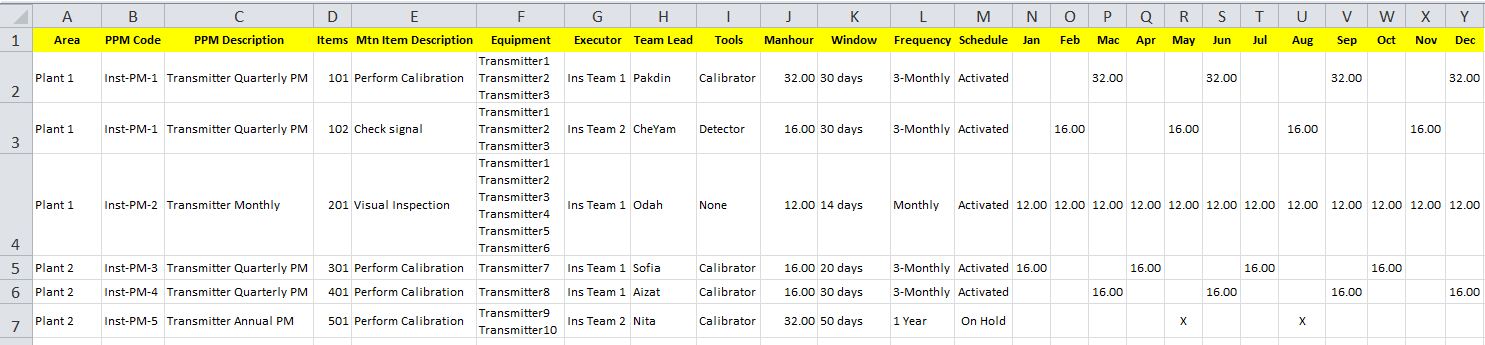
I have a database of Preventive Planned Maintenance (PPM) activities saved in Excel worksheets. The PPMs are organized in a roster, where each PPM takes one row of the worksheet. For each PPM, there is a list of equipment stored in one cell, and manhours stored in a few cells along with other information.
Here's a screenshot of the original data:
I want the equipment list to be separated into individual cells in a new row with its PPM data copied, and the manhours divided per equipment.
Basically, this is the result that I want:

Before I share my codes, how would you do it?
Erm... I'm asking like someone actually read my blog... but who knows...
I have a database of Preventive Planned Maintenance (PPM) activities saved in Excel worksheets. The PPMs are organized in a roster, where each PPM takes one row of the worksheet. For each PPM, there is a list of equipment stored in one cell, and manhours stored in a few cells along with other information.
Here's a screenshot of the original data:
 |
I want the equipment list to be separated into individual cells in a new row with its PPM data copied, and the manhours divided per equipment.
Basically, this is the result that I want:

Before I share my codes, how would you do it?
Erm... I'm asking like someone actually read my blog... but who knows...
Subscribe to:
Posts (Atom)